Facebook Timeline Cover Image

The new Facebook Timeline for business pages will become mandatory on this Friday, March 30. If you haven’t set up your page for the changeover, we can help.

One of the most important and easy ways to prepare your new Timeline is by adding a cover photo. The recommended dimensions are 850 pixels by 315 pixels. We have a cover photo on our Facebook timeline that you are welcome to use until you have your own image. You can access our cover image in the download library. Open the folder named Broker Website Tools, where you’ll find another folder called New Website Artwork. The cover image is in the NewSocialMedia subfolder.

Help-U-Sell Real Estate Facebook Timeline Cover Image
Help-U-Sell Real Estate Facebook Timeline cover image

When you are ready to select your own cover image, keep these rules and suggestions in mind.

Facebook does not allow promotional or text-based cover images. You also can’t include pricing or your website URL. Avoid stock images and try to incorporate the Help-U-Sell colors. A couple of ideas: a quality photo of your office building or an image of you and your friendly staff wearing Help-U-Sell shirts.

The new profile picture dimensions are 180 pixels by 180 pixels. You can use a logo or a photo of yourself. The key is to be consistent with your branding and be identifiable.

If you have any questions or want feedback on your Facebook cover image, please contact Kendra or Tony.
New Seller Savings Comparison Calculator

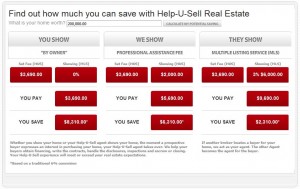
We’re about to unveil a new version of the Seller Savings Comparison chart for the broker websites. The new version will allow you to personalize the chart to show your set fee, and your sellers can enter their home’s value and calculate their potential savings.

We have some design work to complete before we recommend adding the page to your site, but here is a preview of the basic structure. In the example, the seller has entered $200,000 as his home’s value, and the broker has a set fee of $3,690 and a showing fee of $2,000.

Help-U-Sell Real Estate Seller Savings Comparison Chart
The new Seller Savings Comparison chart will allow you to enter your office's set fee and your seller to calculate his potential savings.

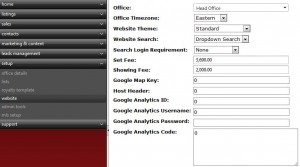
You can populate the chart with your set fee and showing fee by logging into your OMS, clicking on “Setup” in the drop-down menu and selecting “website” from the submenu. You will add in your set fee and showing fee as shown in the example below.

Help-U-Sell Real Estate set fee and showing fee data fields
This is where you enter your set fee and showing fee in the OMS.

If you have any questions about how to use the chart or how to fill it in with your set fee and showing fee, please contact us. The chart will be ready for you to publish soon. We will keep you updated.

Winter Warm-Up Results Are In!

The results are in for our Winter Warm-Up Contest! During the contest, which started Nov. 1 and ended Feb. 29, Help-U-Sell offices earned points for each new listing, each closed buyer side and each closed seller side.

The top three offices in total points have earned admin fees and Help-U-Sell shirts. The top point-getter in each of the three categories (new listings, closed buyer sides and closed seller sides) also have won prizes. Note: Offices that won in the total-points category were not eligible to win in the individual categories, and no one could win in more than one category. For more information about the points and the prizes, read the initial Connect post about the contest.

Without further ado, here are your winners!

Total Points

1) Help-U-Sell Honolulu Properties 392 points

2) Help-U-Sell Detwiler Realty 234 points

3) Help-U-Sell Heritage Real Estate 206 points

New Listing Points

Winner: Help-U-Sell Quad Cities Realty 160 points

Buyer Side Points

Winner (tie):  Help-U-Sell Galleria Realty 45 points

Winner (tie): Help-U-Sell Real Estate Specialists 45 points

Seller Side Points

Winner: Help-U-Sell Select Services 64 points

We are proud of all of our participants. You all really stepped up your efforts, and in a year-over-year comparison, Help-U-Sell offices produced 15% more listings and closings in the November 2011-February 2012 period than in the November 2010-February 2011 period.

New Broker Websites to Launch March 1

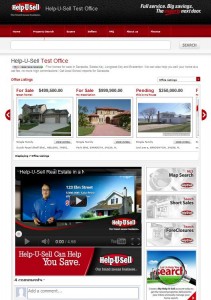
We are excited to announce that our new broker websites will be available next Thurs., March 1. The new look is modern, clean and very user-friendly. On the homepage, the top section below the search bar showcases your office listings, featured properties or open houses. Beneath the carousel of listings is where your personalized content appears. We encourage you to record a 30-second welcome video if you don’t have one already. You can also use text and images in that open space to the left of the banners. We also suggest incorporating your office’s Facebook account into your page so that users can comment on your site and you can start a dialogue with your potential clients.

Help-U-Sell Real Estate Broker Site Homepage
Here's the standard version of the new Help-U-Sell Real Estate broker website homepage.

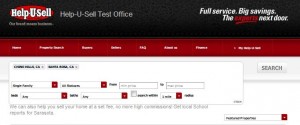
The new website design’s search functionality, which will be on every page of the site, combines the best of the intelligent search and the filtered search. Users will be able to type in what they’re looking for and choose from drop-down menus for property type, status, number of bedrooms and number of bathrooms. The user can also enter a price range and the farthest distance from his chosen city(or cities) he wants to see results from.

Help-U-Sell Real Estate Broker Site Search Functionality
Users can search in multiple cities and filter the search results in a number of ways from any page on the broker's website.

Brokers will have more freedom to control their sites to suit their markets. You will be able to change the names of the navigation headers, such as “Buyers” and “Finance.” Also, if your office doesn’t deal with commercial property or if you have no rentals, you can remove those options from the type and status filters, respectively.

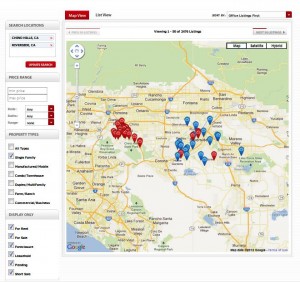
The Map View Page on the Help-U-Sell Real Estate Broker Site
On the map page, users can further refine their search results.

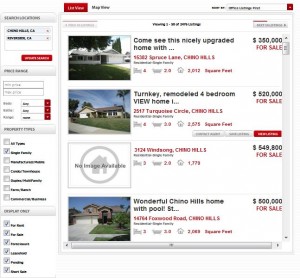
Like in the map view, the properties in the list view can be sorted by Office Listings First, Latest First, Price: High-Low and Price: Low-High. You can select which sorting category is the default. On mouse-over of a listing, three buttons appear: Contact Agent, Save Listing and View Listing.

Help-U-Sell Real Estate Broker Site's List View
Upon mouse-over in list view, a property's agent can be contacted and its listing can be saved and viewed.

The features featured in this article just scratch the surface of what the new website offers. We invite you to try it out before it launches next week. Go to www.testoffice.helpusell.com.

If you have any comments, questions or suggestions, please share them with us in the comments or personally via email or phone.

Help-U-Sell Receives Franchise Satisfaction Award

Help-U-Sell Real Estate Wins Franchisee Satisfaction Award
Help-U-Sell Real Estate won a 2012 Franchisee Satisfaction Award from Franchise Business Review.
We are honored to announce that we have been selected as one of the top real estate franchises in North America for 2012.

The designation is based on franchisee satisfaction as determined by a survey conducted by Franchise Business Review, a U.S. franchise market research firm. You can view the list of real estate franchise winners on the Franchise Business Review website.

What we love most about receiving this award is that it means our franchisees believe in our business model and, more importantly, believe that we at Help-U-Sell Real Estate are serving them to the best of our abilities.

To our franchisees, we say “thank you” for your votes of confidence. To prospective franchisees, we encourage you to contact us if you want to learn more about the Help-U-Sell franchise opportunity. You can learn more about Help-U-Sell and also contact us via our Franchise Opportunity Center.